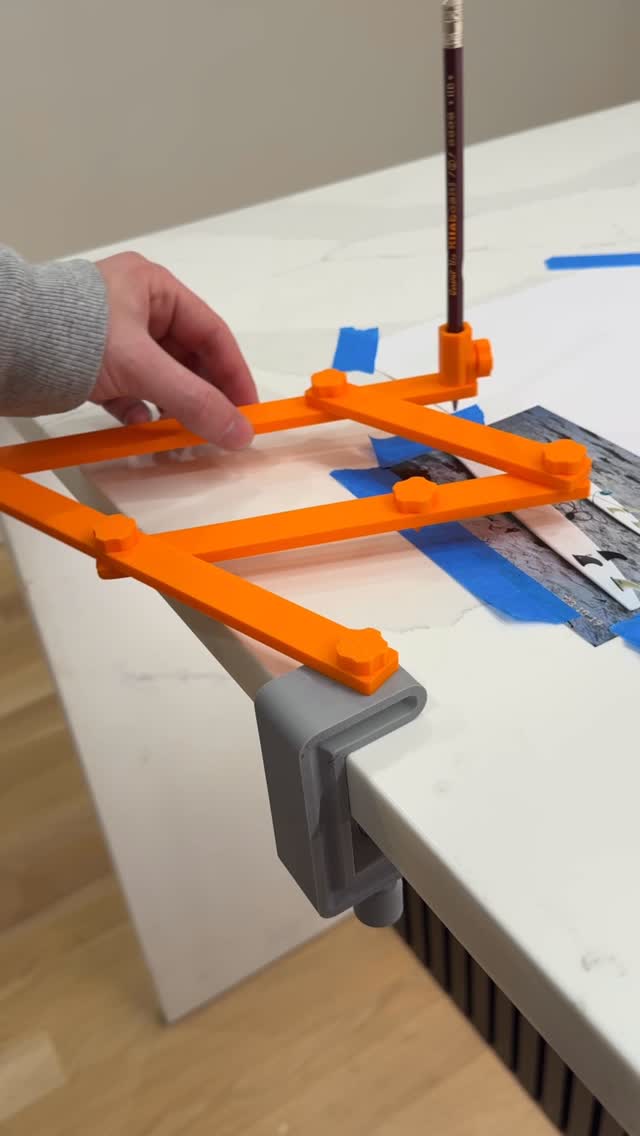
3D Printing Everyday for 365 Days #stem #3dprinting #3dprint #ideas
Search inside any video
SavedThat transcribes your saved videos and lets you search across all of them instantly. Save this video and find any moment.
TL;DR
In this video, the creator designs and prints a pantograph tool to help with tracing images, showcasing the assembly process and its functionality.
Chapters
- 0:00Introduction to Day 32901
- 0:05Concept of the Pantograph02
- 0:10Designing the C Clamp03
- 0:15Assembling the Tool04
- 0:20Testing the Pantograph05
- 0:25Conclusion and Preview of Day 33006
Transcript
Day 329 of 3D modeling and printing every day for 365 days straight. I'm a terrible artist, so today I want to make a fun tool that could potentially help me with that. See, back in the depths of my memory, I remember seeing a tool that lets you trace an image and even scale it with nothing but some links. So today I set out to design and print a pantograph. The linkages need a tethered pivot point, so I made the C clamp that anchors it down.
And the pieces screwed together for easy assembly, plus it lets you adjust the height of things like the tracer. And that seems to work pretty well., despite how my drawing looks. Anyways, stick around for day 330.
Are you the creator or rights holder of this video? Request removal of this transcript.
Related Transcripts
 0:27Instagram
3D Printing Everyday for 365 Days #stem #3dprinting #3dprint #ideas
_charlie_designs
 0:32Instagram
3D Printing Everyday for 365 Days #stem #3dprinting #3dprint #ideas #useful
_charlie_designs
 0:27Instagram
3D Printing Everyday for 365 Days #stem #3dprinting #3dprint #ideas
_charlie_designs
 0:27Instagram
3D Printing Everyday for 365 Days #stem #3dprinting #3dprint #ideas
_charlie_designs
 1:06Instagram
ESSENTIAL DYSON VACUUM MODS #dyson #3dprinting #springcleaning #diy #cleaning
PrintLair
 0:38Instagram
Day 2 of 20 Office 3D Prints #3dprinting If you would like any information on…
Josh
Never lose a moment again
Save videos from YouTube, Instagram, and TikTok. Search everything that was said, and jump to the second.
Start Saving Videos - Free Trial