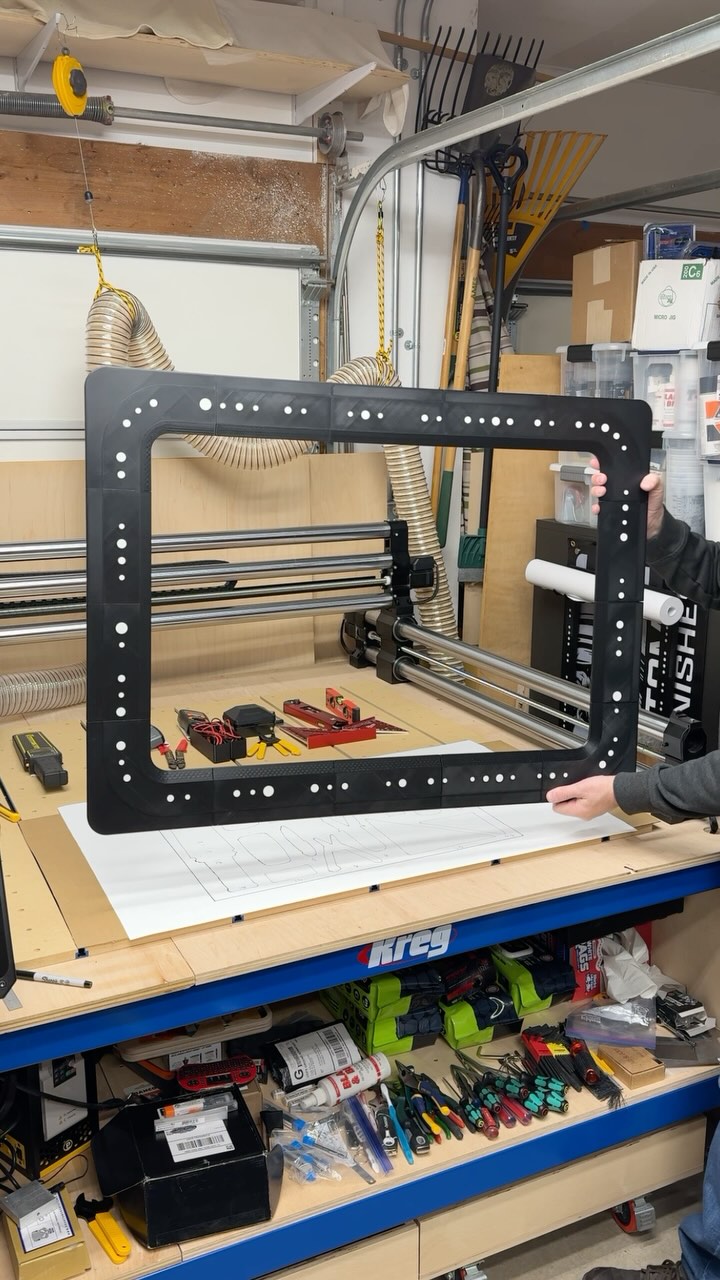
Today I’m scanning and carving the next two tool box drawers into kaizen foam…
Search inside any video
SavedThat transcribes your saved videos and lets you search across all of them instantly. Save this video and find any moment.
TL;DR
In this video, Steve Moseley demonstrates how to scan and carve toolbox drawers into Kaizen foam using custom shapes and Vectric software.
Chapters
- 0:00Creating the shape frame01
- 0:10Scanning the toolbox drawer02
- 0:20Using Vectric software03
- 0:30Cutting shapes in Kaizen foam04
- 0:40Final results and tool fitting05
Transcript
So I made my own shape or trace frame that was three times the size of the original so I could lay it on a piece of paper and do one scan of a full toolbox drawer. The drawers in this scan are 18 inches deep and 24 inches wide and then I pulled that into Vectric software, made all my tool paths and now I'm cutting out the shapes of those in Kaizen foam.
It's a fun process watching the top layer get removed and revealing that red inner core and it's super satisfying when you get it all done and your tools fit in place just like this. Comment below with the word frame and I'll send you information on how you can get this mega size shape or trace frame file for your bamboo lab printer or you can get pre-printed
versions so you can get started right away.
Are you the creator or rights holder of this video? Request removal of this transcript.
Related Transcripts
 2:26Instagram
Just sharing the tools with ya.
Austerity Project
 1:16Instagram
Listen… don’t call it OCD 😂 I just think everything deserves assigned seating…
Caimar Salizi
 1:31Instagram
More storage solutions in my shop - this time it's my tablesaw blade storage.
David Bedrosian - Waterloo, ON
 1:20Instagram
PART 2 of building our DIY library 🥹📚 If you’d told me a year ago we’d be…
Jack Kinsey [Interior Design Masters]
 0:54Instagram
Need a jig?
Phil.Makes.Stuff
 2:20Instagram
If you saw my drill press cabinet where I store all of my bits, you may be…
David Bedrosian - Waterloo, ON
Never lose a moment again
Save videos from YouTube, Instagram, and TikTok. Search everything that was said, and jump to the second.
Start Saving Videos - Free Trial