Dear Higgsfield, I reverse engineered you in 12 hours
Search inside any video
SavedThat transcribes your saved videos and lets you search across all of them instantly. Save this video and find any moment.
TL;DR
In this masterclass, Sirio demonstrates how to reverse engineer Higgsfield's Genjutsu to bypass IP restrictions and create personalized video content.
Chapters
Transcript
Hi, welcome to this masterclass. My name is Sirio, and this is entirely AI. I'll show you. So that's me in a scene that I was never in, and I didn't even use any app to make it. And this is what happens when you try to do it the normal way. I'm uploading that same template video into Seedance 2.5 and asking
you to swap me in. Blocked. But apps like Higgsfield's Genjutsu do this exact thing all day, every day with these exact videos. So how the f*** are they getting around it? Hey friend, welcome back. Today we're going to reverse engineer Higgsfield's
Genjutsu and we're going to get around the IP blocks in Seedance 2.5 so that you guys can put yourself into pretty much any movie scene or talking head you want without any special software. A quick heads up before we start. This video is for educational purposes only.
I want you to understand how these AI models work and what they can really do. And this might end up being the first episode of a new series where I show you guys the stuff that they do not want you to know. And by they, what I'm talking about.
Okay, so no fluff. Here's how this is going to work. We're going to start by doing the whole thing by hand. Okay, it's going to break on us twice and we're going to fix both times. At every step along the way, I'm going to pause and tell you why it works and not
just what to click. And then I'm going to give you the AI or the automatic version, the agent version, though the workflow so that you can turn it into a template for your own stuff. And in the next videos, we're going a lot further and we're going to
make things like this. I'm Kim Kardashian and this is masterclass. I'm Cereo and this is your time to build something of your own. Cut. Good job. So what do you think? Was it any good?
Man, you killed it. But first the basics. So let's not waste any more time. You guys have all seen these videos that are everywhere right now. And the way that it works is that you upload a photo of yourself and then you pick a template video and then it just swaps you in for the person that is in that template
video. It's the same moves, the same everything, the same lip syncing. And most people get this from one of those wrapper apps that sells it as a feature. And like I've said before, that's really the whole reason that the wrapper works and
good for them. What by that is that they are selling to you an API workflow. It is not the AI model. It's the workflow. It's the thinking. They are selling you the thinking that they do for you and you just press a button. And so this tutorial is for those people who want to
build that button. I spend the last 12 to 24 hours on this going through open source models, masking, cutting people out and a whole bunch of other subs that didn't work. And I ended up with the one that I'm going to show you today.
So let's go back to that blog generation from the start. This is the template. And all I did here was I head over to CDense 2.5. I uploaded this exact video and I typed replace the character in the video with the picture that I uploaded. And it got blocked for IP, which, sure, it makes
sense. These people are famous. But like I said, this exact video works totally fine in Genjutsu. But before we build anything, I think that it is important for us to understand why because if you get this part, the rest of the video is just details. There are really only two things that get you blocked here. The first one is the face. The second one is the music.
And the way that I like to think about this is that the video is really carrying these two things at the same time. It's carrying who's in it. So the face, the voice, the music, and it's carrying how things move. So the motion, the timing and the lips and the filter, the IP filter
only cares about the who. It does not care about the how and the how is the movement. So the whole idea here is that you keep the how, the movement and you throw away the who, the IP and everything that we're going to do from here on out is really just hide one of those two things, obviously without losing the movement. So the first thing that we're going to have to do is turn this template into
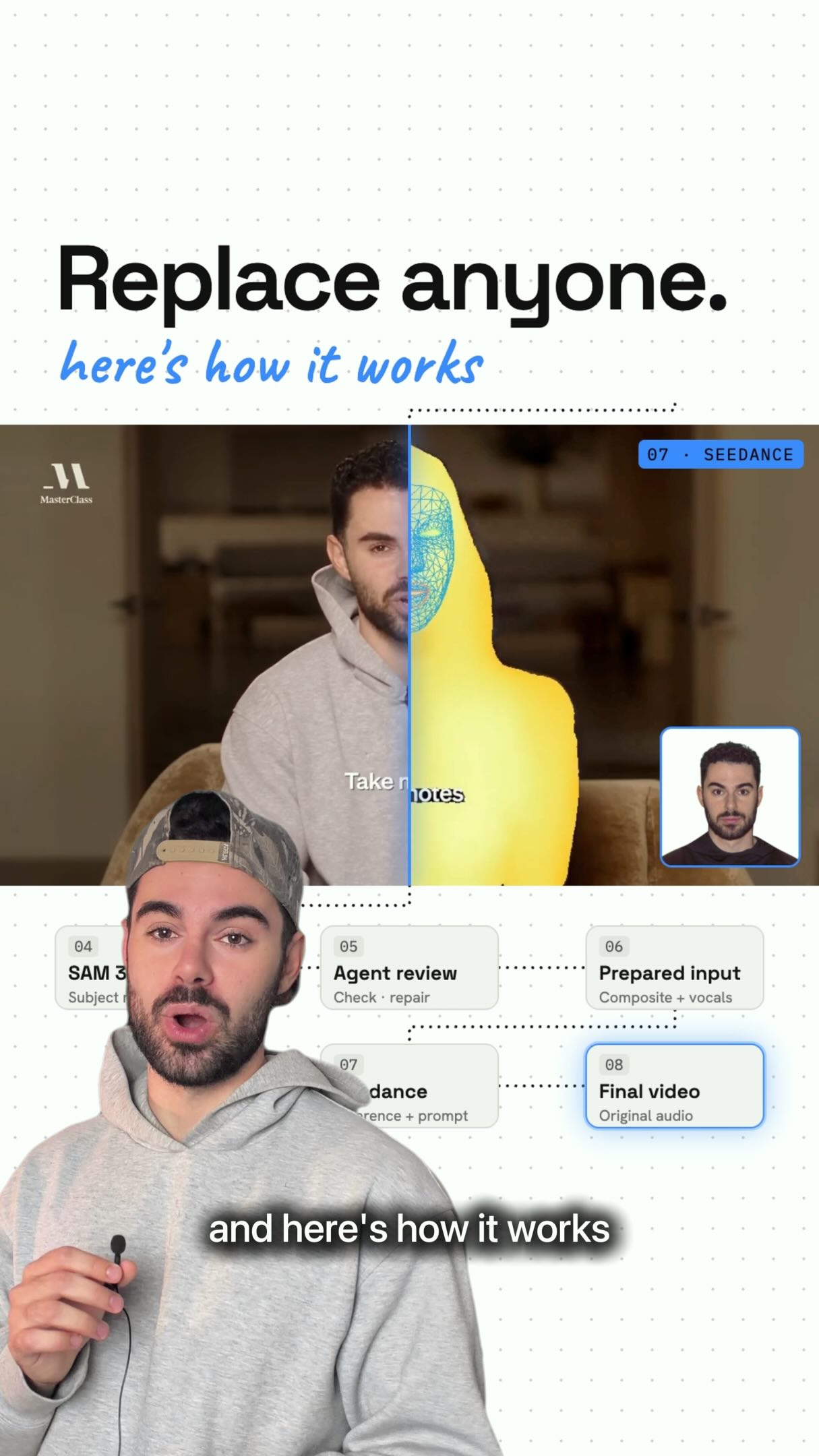
something where the AI cannot tell who the people are, but he can still see how they move. And for that, we're going to use something that is called depth anything. You can find it on hugging phase or replicate or foul. And all you have to do is that you upload your video, you click generate, and then
you get something like this. So this is what's called the depth mask. And what by this is that it throws away what everything looks like and it keeps how close or how far things are from the camera.
Like it's the depth. If you've used Photoshop or you've done retouching before, it's very similar to dodge and burn. But in this case, it tracks all the movements, the movements are still there. But the faces, as you can see, they're not just a silhouette.
This one is from foul. And this one is from replicate. I like the one from replicate. Just, I don't know. I just like the colors of it. There's no difference. You can use the one from foul too. And there's one more thing, which is the audio, right? If we want the lips to match the song, then the audio has to
go through as well. Now, the first thing that most people would say is just muted, but we cannot do that. And the reason why is that AI needs to hear the voice in order for it to move the mouth. So instead of muting it, we're going to keep the voice, but get rid of everything else. Keep the actual words, remove the soundtrack, remove the background music.
So what I'm going to do is that I'm going to take this depth mask and bring it into cap cut. And I'm just going to make a new project and drag the clip in. And then I'm going to click on it. And over here on the right hand side, I'm going to go to audio, then voice changer,
then voice filters, then I'm going to pick pitch up. This is a voice filter. And what it does, it just changes the pitch of the music. And then once that's done, I'm going back to the basics. I'm going to click on isolate voice, then keep only the vocals.
And so now what's left is only the acapella without the music or soundtrack. So listen to it. So that's both of them hidden. Right.
C dense 2.5 isn't going to block this anymore because there are no faces. There's no music and we still have all of the movement, right? Pretty neat. Now, instead of giving it the original video, we're going to give it the depth mask video plus our own photos and then swap the people in.
Keep reading - 53 more segments
Sign in free to read the full transcript, save this video, and search inside everything you save.
Sign in to continue readingPrefer the original? Watch the video
Are you the creator or rights holder of this video? Request removal of this transcript.
Related Transcripts
 1:29Instagram
Higgsfield’s Genjustu exposed.
Sirio Berati
 17:27YouTube
Claude Fable 5 + Higgsfield MCP Will Make You Rich!
Higgsfield AI
 18:52YouTube
Higgsfield MCP + Claude Just Changed Marketing Forever!
Higgsfield AI
 33:23YouTube
Make Ultra Realistic AI Short Films with Fable 5 + Seedance 4K (Full Workflow)
Higgsfield AI
 28:15YouTube
Claude Video Editing Just Became Unrecognizable
Nate Herk | AI Automation
 0:41YouTube Shorts
How to make simple swaps in your videos using Higgsfield
Rourke Heath
Never lose a moment again
Save videos from YouTube, Instagram, and TikTok. Search everything that was said, and jump to the second.
Start Saving Videos - Free Trial