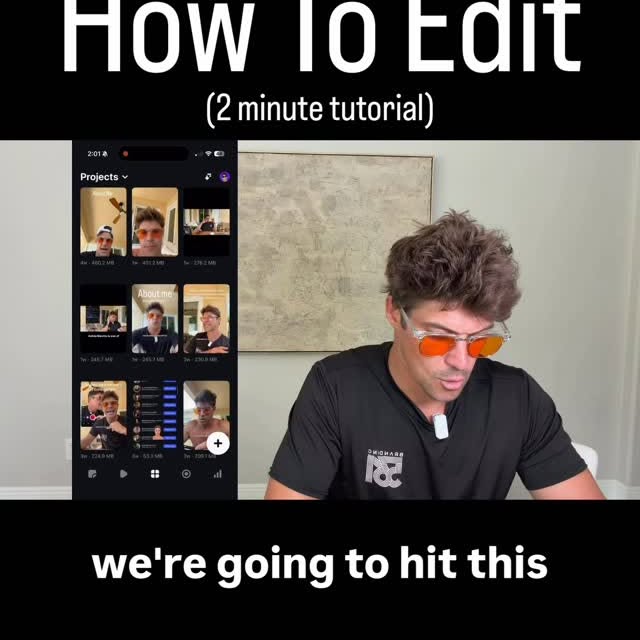
We're gonna hit this plus sign in the bottom right.
Search inside any video
SavedThat transcribes your saved videos and lets you search across all of them instantly. Save this video and find any moment.
TL;DR
Learn how to use green screen effects and edit videos, including adding captions and managing clips on the timeline, to create engaging content.
Chapters
- 0:00Introduction to Green Screen Editing01
- 0:15Using the Teleprompter Feature02
- 0:30Analyzing Housing Market Trends03
- 0:45Editing Video Clips on the Timeline04
- 1:00Generating Auto Captions05
- 1:30Finalizing and Posting the Video06
Transcript
We're gonna hit this plus sign in the bottom . We're gonna hit camera. We're gonna hit green screen. We're gonna hit change background at the top, and we're gonna put the headline here. We're gonna hit the record button, and we're gonna read the script. Now, if you wanna put the script in the teleprompter, you're gonna hit this button here. Now we have the whole script here, and it's on the teleprompter in front of us. Also, with your two fingers,
you can make your face bigger or smaller in the green screen video this. You can also move your face around that. The people screaming about a housing crash have been wrong for years. According to the National Association of Realtors, so I fucked up. In the bottom left-hand corner, it shows the clip with a little X.
You're gonna hit that X, and then you're gonna hit discard, and it's gonna take you back to where you were. Now, we're going to go to this screenshot showing the median sales price every single month this year. Here are the numbers for every, here are the numbers for the median sales price,
here are the numbers for the increase of median sales price just this year. January, February, March, April, May, June, July. You see the trend. Now we're gonna switch it to this. So if you and your spouse have been thinking about trading up to finally be in your dream home that you plan on living in for the next 30 years,
shoot me a message, and I'll help you out. All , so now we have all of the clips on the timeline here. So now what we're gonna do is, the first thing we always do when we edit a video is we hit CC to generate the auto captions. It's gonna take about 15 to 20 seconds or so.
Then the captions are gonna be overlaid on the timeline in blue blocks, and then you're gonna highlight the timeline here, and you're gonna drag it until the blue block starts to move just that. Now we're gonna go along the timeline, we're gonna do the same thing here, trim it here.
The way they have since forever of time, it's gonna be more and more money to finally buy your dream house that you and your wife always talk about. I think it came out pretty good. We're gonna hit Next, and then we're gonna post that on Instagram.
I think it came out pretty good. We're gonna hit Next, and then we're gonna post that on Instagram.
We're gonna hit Next, and then we're gonna post that on Instagram.
and then we're gonna post that on Instagram.
Are you the creator or rights holder of this video? Request removal of this transcript.
Related Transcripts
 1:06Instagram
comment “outbound” for the free guide
Zach Chang
 0:47Instagram
𝙎𝙩𝙤𝙥 𝙋𝙤𝙨𝙩𝙞𝙣𝙜 𝙤𝙣 𝙄𝙣𝙨𝙩𝙖𝙜𝙧𝙖𝙢 𝙐𝙣𝙩𝙞𝙡 𝙔𝙤𝙪 𝙁𝙞𝙭…
Innerlink | Content Marketing
 1:31Instagram
Stop Ruining Your Videos 🛑 #videoediting #shortformvideo #contentcreation
David Mansilla | Video Editing
 0:55Instagram
This is the UI Tracking Effect!
Declann Drostan Tan | Content Creator
 1:17Instagram
This is game changing in terms of tools built for creators.
Will Schafer
 0:31Instagram
comment “editor” to get free access!!
alex
Never lose a moment again
Save videos from YouTube, Instagram, and TikTok. Search everything that was said, and jump to the second.
Start Saving Videos - Free Trial