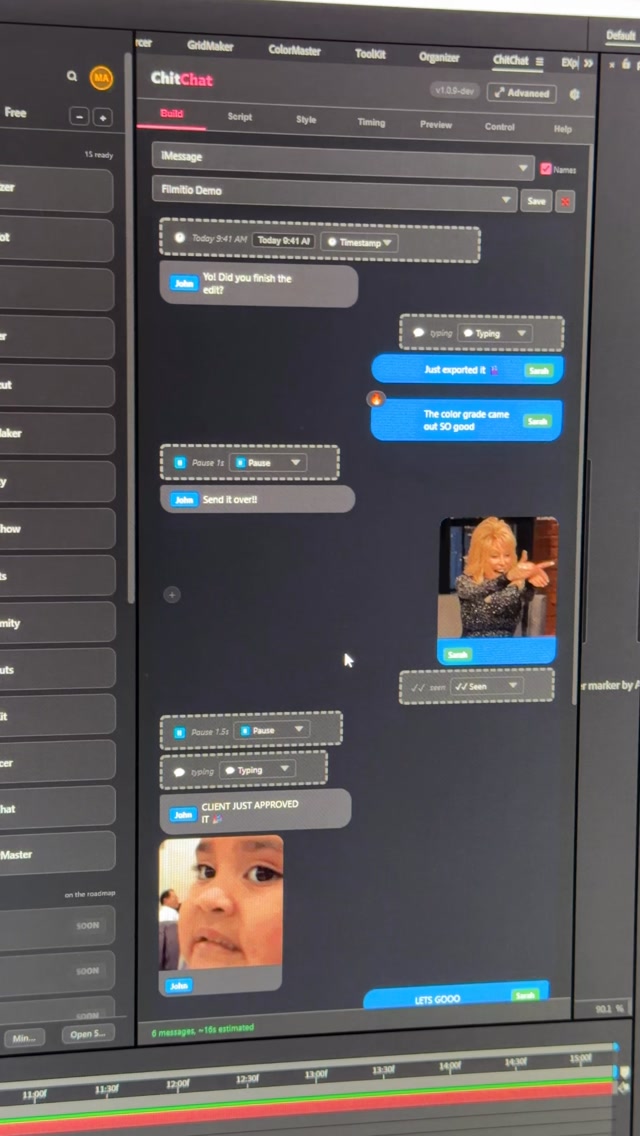
Comment CHITCHAT and I’ll send you the link 👇 Stop building text message bubbles by hand.
Search inside any video
SavedThat transcribes your saved videos and lets you search across all of them instantly. Save this video and find any moment.
TL;DR
Learn how to use the Chitchat plugin for After Effects to create text message flows easily. Discover different styles and how to access more plugins.
Chapters
- 0:00Introduction to Chitchat01
- 0:05Building Text Message Flows02
- 0:10Choosing GIFs and Styles03
- 0:15Generating the Flow04
- 0:20Instagram Flow Example05
- 0:25Accessing Filament Studio06
- 0:30Conclusion07
Transcript
This is Chitchat, an After Effects plugin that lets you natively build text message flows inside of After Effects. Type in your flow, pick your GIFs, set it up however you want, and then hit generate. And then just like so, inside of After Effects, it's been generated. Choose any style you like, let's try Instagram. Let's generate the same flow, and now we have an
Instagram flow. Comment Chitchat and I'll send you a link to try it for free. Once you install Filament Studio, you get access to Chitchat and all these other plugins to try out as well. Have a good time.
Have a good time.
Are you the creator or rights holder of this video? Request removal of this transcript.
Related Transcripts
 0:43Instagram
Comment “app” and I’ll send you the app ✅
createdbyaris
 0:31Instagram
👇🏼Comment « VIDEO » and I’ll send you all the tool links.
Adrien Ninet
 0:31Instagram
comment “editor” to get free access!!
alex
 0:43Instagram
Comment RL and I'll send you the site that turns a screenshot into a $10,000 looking video.
Raylight
 1:06Instagram
Editing has gotten a whole lot easier now that we can speak to edit out videos…
Jens Heitmann
 0:41Instagram
Comment Ai for the link.
Jo Mendes
Never lose a moment again
Save videos from YouTube, Instagram, and TikTok. Search everything that was said, and jump to the second.
Start Saving Videos - Free Trial